

Protecting students, staff, and assets is every school administrator’s top priority. Yet many educational institutions still rely on outdated key management practices that leave critical areas vulnerable. Lost master keys, unauthorized access, and security breaches can put your entire school community at risk.
Modern key management systems offer a comprehensive solution to these challenges. This guide explores how electronic key management can transform your school security infrastructure, providing the accountability and control today’s educational environments demand.
What is a Key Management System?
A key management system is an electronic security solution that automates the storage, tracking, and distribution of physical keys. Unlike traditional key cabinets or peg boards, these systems use advanced technology to control who can access keys, when they can take them, and how long they keep them.
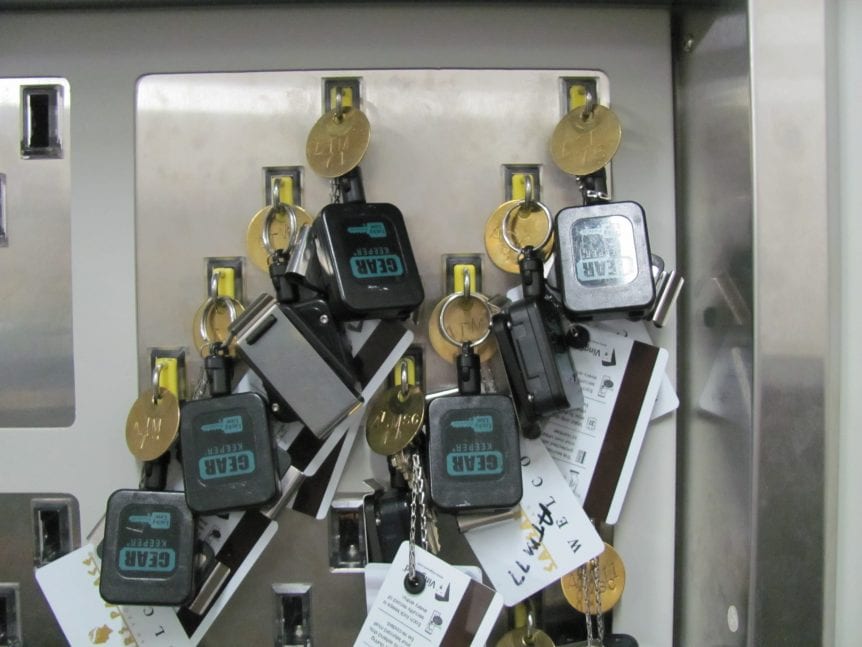
The system consists of a secure cabinet that houses keys individually. Each key is attached to a SmartKey device with unique identification. Users must authenticate themselves through PIN codes, proximity cards, or fingerprint scanners before the system releases specific keys. Every transaction is logged automatically, creating a complete audit trail.
These systems eliminate the guesswork from key management. No more wondering who has the gymnasium keys or when they’ll be returned. Everything is tracked digitally with real-time visibility into key status and location.
Benefits of Implementing a Key Management System in Schools
Enhanced School Security
Traditional key management creates security vulnerabilities that electronic systems eliminate. When keys go missing, schools often face the expensive choice between rekeying locks or accepting the risk. A key management system ensures keys stay secure and accounted for at all times.
The system prevents unauthorized duplication since keys remain in the secure cabinet when not in use. Access controls ensure only authorized personnel can retrieve specific keys, protecting sensitive areas like computer labs, chemical storage, and administrative offices.
Complete Accountability and Audit Trails
Every key transaction generates a permanent record showing who took which key, when they retrieved it, and when they returned it. This detailed audit trail proves invaluable for security investigations, compliance reporting, and operational reviews.
School administrators can quickly identify patterns of use, spot potential security issues, and ensure proper key handling procedures are followed. The system eliminates finger-pointing when keys go missing and provides concrete evidence for security audits.
Streamlined Operations
Manual key management consumes valuable time for administrators and security staff. Electronic systems automate routine tasks like tracking key locations, sending return reminders, and generating usage reports.
Staff members enjoy faster access to the keys they need without waiting for administrative approval or searching through disorganized key storage. The system can operate 24/7, providing access for after-hours events and maintenance activities.
Cost Savings
While the initial investment in a key management system might seem significant, the long-term savings are substantial. Schools avoid costly rekeying projects when keys are lost or stolen. Reduced administrative time and improved security help prevent expensive security incidents.
The system also extends key life by preventing loss and damage. Keys stay organized and protected, reducing replacement costs and maintenance expenses.
Improved Compliance
Educational institutions face increasing regulatory requirements around security and access control. A key management system provides the documentation and controls needed to demonstrate compliance with safety regulations and insurance requirements.
Automated reporting capabilities make it easy to generate the audit trails and access records required by various oversight bodies. This documentation proves particularly valuable during security assessments and insurance reviews.
Features to Look for in a Key Management System
User Authentication Options
Look for systems that offer multiple authentication methods to match your school’s security needs and user preferences. PIN codes provide basic security, while proximity cards offer convenience for staff who already carry ID badges. Fingerprint scanners deliver the highest security level and eliminate concerns about forgotten codes or lost cards.
The best systems support multiple authentication methods simultaneously, allowing different user groups to access the system using their preferred method.
Real-Time Monitoring and Alerts
Choose a system that provides instant visibility into key status and location. Real-time monitoring allows administrators to see which keys are checked out, who has them, and when they’re due back.
Automated alerts notify administrators when keys are overdue, when unauthorized access attempts occur, or when system maintenance is needed. Email and text notifications ensure critical information reaches the right people immediately.
Scalability and Network Integration
Your key management system should grow with your school’s needs. Look for solutions that can accommodate additional keys, users, and locations as your requirements expand.
Network connectivity enables centralized management across multiple buildings or campuses. Administrators can monitor all locations from a single interface and maintain consistent policies across the entire school district.
Detailed Reporting Capabilities
Comprehensive reporting features help administrators understand key usage patterns, identify security risks, and demonstrate compliance. Look for systems that offer customizable reports covering user activity, key status, and security events.
The ability to export data for analysis or integration with other systems adds flexibility for schools with specific reporting requirements.
Tamper-Proof Construction
School environments demand durable equipment that can withstand daily use and potential tampering attempts. Choose systems built with heavy-duty steel construction and tamper-evident features.
The cabinet should resist forced entry attempts while maintaining easy access for authorized users. Quality construction ensures reliable operation and protects your investment over time.
Genesis Resource KeyWatcher Solution
Genesis Resource has served the security industry since 1988, providing key management solutions to organizations worldwide. Their KeyWatcher systems deliver the advanced features and reliability that educational institutions require.
KeyWatcher Touch System
The KeyWatcher Touch features a large 7-inch touchscreen interface that staff members find intuitive and easy to use. The familiar smart device interface reduces training requirements and improves user adoption.
Key features include:
- Multiple authentication options (PIN, fingerprint, proximity card)
- Real-time database synchronization across networked systems
- Customizable user permissions and access schedules
- Automated email and text notifications
- On-screen display of available keys and their locations
- Advanced integration capabilities with third-party security systems
KeyWatcher Illuminated System
For schools seeking a cost-effective solution, the KeyWatcher Illuminated system provides essential key management features with a traditional LED display interface.
This system offers:
- Two-line LED display with clear user prompts
- Durable metal keypad for reliable operation
- Support for up to 2,000 users
- PIN or proximity card authentication
- Standalone or networked operation
- Basic email notification capabilities
Smart Locker Systems
Beyond traditional keys, schools often need to secure larger items like laptop computers, tablets, radios, and specialized equipment. KeyWatcher Smart Locker systems provide the same security and accountability for these valuable assets.
These systems can secure:
- Laptop computers and tablets
- Two-way radios and communication devices
- Specialized tools and equipment
- Cash handling supplies
- Personal protective equipment
- Emergency response gear
Customization and Integration
Genesis Resource KeyWatcher systems offer extensive customization options to match your school’s specific requirements. Cabinet sizes, key slot configurations, and authentication methods can be tailored to your environment.
The systems integrate seamlessly with existing security infrastructure, including access control systems, surveillance platforms, and facility management software. This integration creates a comprehensive security ecosystem that protects your entire campus.
Take Action: Securing Your School with Effective Key Management
Schools cannot afford to leave security to chance. The safety of students, staff, and assets depends on maintaining strict control over physical access. Traditional key management methods simply cannot provide the accountability and security that modern educational environments require.
Electronic key management systems represent a proven solution that addresses the unique challenges schools face. From protecting sensitive areas to maintaining compliance with safety regulations, these systems deliver measurable benefits that justify the investment.
The time to act is now. Every day your school operates without proper key management creates unnecessary risk. Lost keys, unauthorized access, and security breaches can have devastating consequences for your school community.
Genesis Resource KeyWatcher solutions provide the reliability, features, and support your school needs to maintain the highest security standards. With over 35 years of industry experience and thousands of satisfied customers, Genesis Resource understands the unique requirements of educational institutions.
Contact Genesis Resource today to schedule a free demonstration of their KeyWatcher systems. Discover how electronic key management can transform your school security operations and provide the peace of mind your community deserves. Your students, staff, and stakeholders are counting on you to make the right choice for their safety and security.